I'm going to try a thing we've been doing on Philofaxy for years: Free For All Friday, where anyone can post a comment and/or ask a question. Some examples of discussion: are you looking for a particular planner? Want some ideas on how to use your planner system more effectively? Have you found a new planner you want to tell us all about? This is an open forum to discuss anything planner-related with me and the wider planner community.
I'll run FFAF for a few weeks and see if people like it.
So, please post a comment! What's new in your planner world? Have you decided on your planner for 2014 yet?
Friday, September 13, 2013

Wednesday, September 11, 2013
New Brush Dance journals!
Brush Dance has a new collection of gorgeous journals! They very generously sent me two to review.
These are the Perennial Grace Journal and the Renee Locks Dreamer Journal:

Here is the Perennial Grace journal. I love the artwork and the quote:

Here is the Renee Locks Dreamer Journal. What a great quote to have on a journal!

The journals are 5 by 7 inches and slim, with rounded corners and an elastic closure so it can easily go with you everywhere in your bag. There are 136 lined pages of 120 gsm paper! So you can use all your favorite pens with no worries of bleed through.

Here are the back covers, so pretty!
 Here is a closeup so you can see the info:
 Brush Dance has an excellent selection of journals in various sizes, click here to see them all.
Huge thanks to Brush Dance for these gorgeous journals!
These are the Perennial Grace Journal and the Renee Locks Dreamer Journal:

Here is the Perennial Grace journal. I love the artwork and the quote:

Here is the Renee Locks Dreamer Journal. What a great quote to have on a journal!

The journals are 5 by 7 inches and slim, with rounded corners and an elastic closure so it can easily go with you everywhere in your bag. There are 136 lined pages of 120 gsm paper! So you can use all your favorite pens with no worries of bleed through.

Here are the back covers, so pretty!


Huge thanks to Brush Dance for these gorgeous journals!
Tuesday, September 10, 2013
WINNER of the Quo Vadis Journal 21 giveaway!
I'm happy to report the winner of the 2014 Quo Vadis Journal 21 is:
Terry M !!!!!!!
Congratulations!!! Please email your mailing address to me at Laurie at Plannerisms dot com and I will pass it on to Steve so he can send you your new planner!
Thanks to everyone who participated!
Terry M !!!!!!!
Congratulations!!! Please email your mailing address to me at Laurie at Plannerisms dot com and I will pass it on to Steve so he can send you your new planner!
Thanks to everyone who participated!
Sunday, September 8, 2013
Bullet Journal notebook ideas
Ever since my Bullet Journal post a couple of weeks ago, I've been thinking about what types of notebooks would work best for this system. (If you don't know what the Bullet Journal is, please read my post about it and follow the links there to learn about it, then come back).
As I noted in that post, the Bullet Journal system needs to be combined with a longer-range calendar for forward planning. I played with a version of this with a Moleskine Monthly notebook, which would work great for a little while, but with only 50 lined pages after the month calendars it wouldn't last very long.
I tried hand-drawing monthly grids into a notebook, but it took a really long time and I realized it wouldn't be something anyone would want to do every couple of months when they filled up their notebook. In the end it didn't matter for my own personal use, because I use my Plannerisms planner for all forward planning and am now using a notebook (this one) for a daily record and for all lists and notes. It's working great for me and I'll write about it in a later post.
But just today I had a realization that if someone wanted to plan ahead and do a Bullet Journal in one notebook all together, there is a very obvious solution.
Use a notebook, or planner, with monthly pages.
Here's an example: this is a 2013 Paperblanks Ultra size Poe Tamerlane weekly planner I bought a couple of months ago. It was really cheap, and I loved the cover, so I bought it to use as a notebook. But today I realized it would be perfect as a Bullet Journal (or any notebook system) plus forward planning.

The horizontal weekly format works well as a notebook because it doesn't have breaks between the days and the dates are easy to ignore. A week + notes format would work nearly as well (Paperblanks calls their week + notes format Verso) but a format with vertical daily columns probably wouldn't work as well because the columns would break up the page too much.

Anyway, this planner has monthly calendars for all of the current year:

And all of the following year:
 So this would be useful as a notebook any time within the two-year period. Fill in the monthly calendars for forward planning, and use the rest of the planner as a notebook. If you start it at the beginning of the year, you could even use it as a weekly planner from the front and a notebook from the back and start a new one when the content meets in the middle.
Any brand or size of weekly planner with month calendars would work well for this.
If you want more pages in the book, use a day per page planner with monthly calendars and just ignore the date on each day's page. It can be hard to find day per page planners with month calendars included. Paperblanks day per page planners have month calendars. So does the Quo Vadis Journal 21 (which you can enter to win in this post, click through here) and the Time Traveler day per page planner has month calendars too.
Another obvious option would be to use a planning notebook with monthly calendars like these I reviewed awhile back.
I think monthly calendars in notebooks are very useful. What do you think?
As I noted in that post, the Bullet Journal system needs to be combined with a longer-range calendar for forward planning. I played with a version of this with a Moleskine Monthly notebook, which would work great for a little while, but with only 50 lined pages after the month calendars it wouldn't last very long.
I tried hand-drawing monthly grids into a notebook, but it took a really long time and I realized it wouldn't be something anyone would want to do every couple of months when they filled up their notebook. In the end it didn't matter for my own personal use, because I use my Plannerisms planner for all forward planning and am now using a notebook (this one) for a daily record and for all lists and notes. It's working great for me and I'll write about it in a later post.
But just today I had a realization that if someone wanted to plan ahead and do a Bullet Journal in one notebook all together, there is a very obvious solution.
Use a notebook, or planner, with monthly pages.
Here's an example: this is a 2013 Paperblanks Ultra size Poe Tamerlane weekly planner I bought a couple of months ago. It was really cheap, and I loved the cover, so I bought it to use as a notebook. But today I realized it would be perfect as a Bullet Journal (or any notebook system) plus forward planning.

The horizontal weekly format works well as a notebook because it doesn't have breaks between the days and the dates are easy to ignore. A week + notes format would work nearly as well (Paperblanks calls their week + notes format Verso) but a format with vertical daily columns probably wouldn't work as well because the columns would break up the page too much.

Anyway, this planner has monthly calendars for all of the current year:

And all of the following year:

Any brand or size of weekly planner with month calendars would work well for this.
If you want more pages in the book, use a day per page planner with monthly calendars and just ignore the date on each day's page. It can be hard to find day per page planners with month calendars included. Paperblanks day per page planners have month calendars. So does the Quo Vadis Journal 21 (which you can enter to win in this post, click through here) and the Time Traveler day per page planner has month calendars too.
Another obvious option would be to use a planning notebook with monthly calendars like these I reviewed awhile back.
I think monthly calendars in notebooks are very useful. What do you think?
Thursday, September 5, 2013
Guest post: How Christine uses her Uncalendar planner
I was very interested to see how Christine uses her Uncalendar planner! Many thanks to Christine for this detailed guest post!!
How I Use my Uncalendar and a Spiral Notebook to Stay Organized!

Please forgive the dreadful attempts at planner decoration. Obviously this is not my forte. The Uncalendar is basically a spiral bound notebook, with floppy covers (that I stiffened with laminate and PlannerPad’s Insta-Pockets). All the undated weeks are together at the front, behind the “Day/Week” tab. Then the undated months (on 2 pages) follow behind the ‘Month/Goals” tab. There are enough undated weeks and months for a full year. Then, behind “Notes/Tech”, there are 12 pages for notes that I am now using as monthly planning pages.
I clip those sections together at their dividers and just flip between them to my current week and month and month goals.
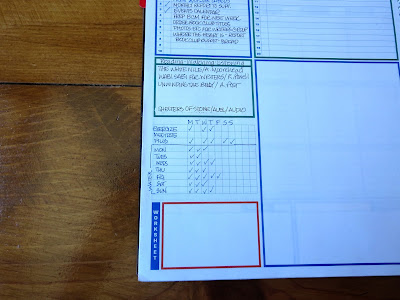
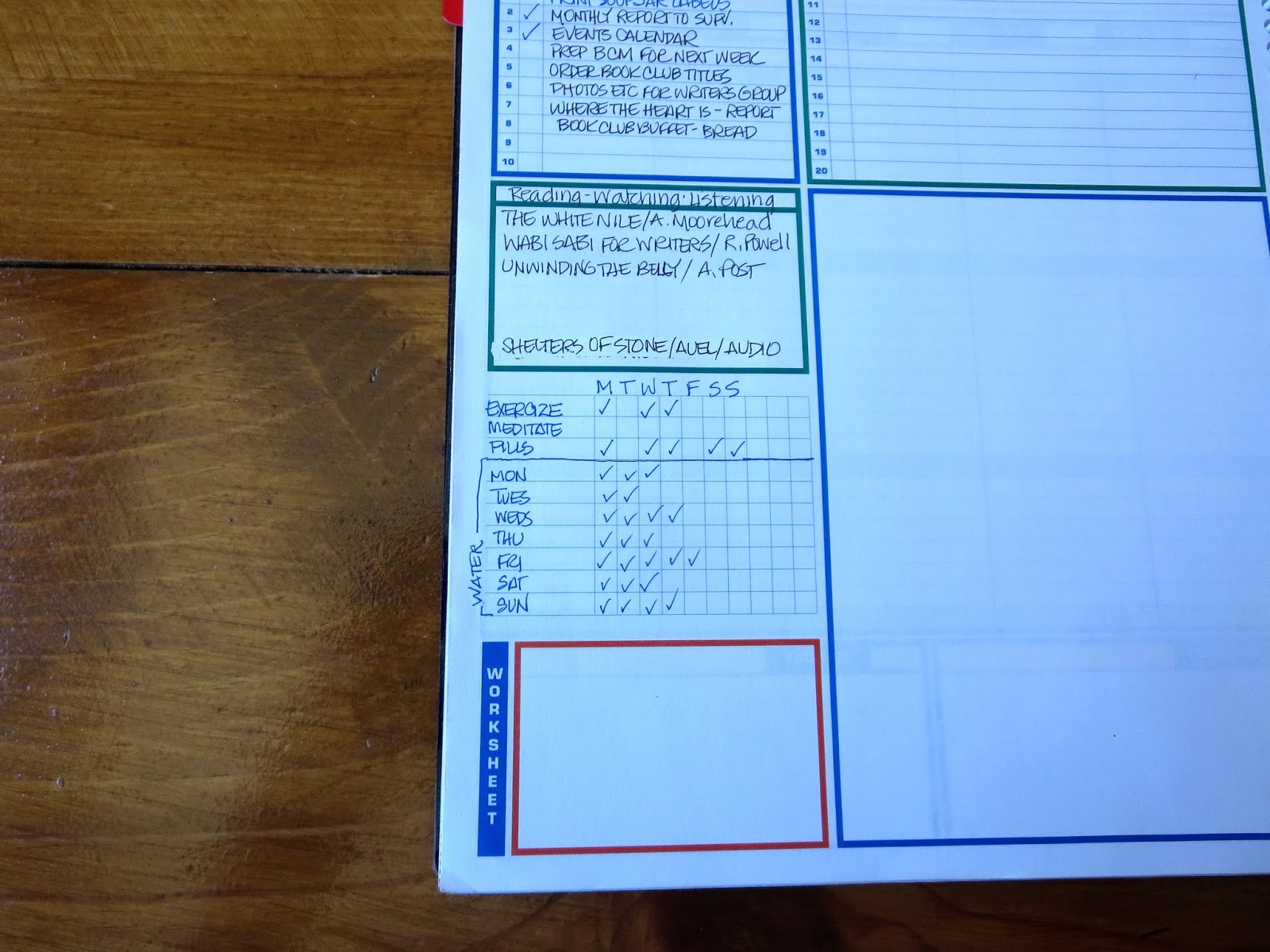
On the week page, I finally have enough room to keep everything important in front of me. There’s a highly visible space to write my most important tasks for the week, a space for tasks that need to be done but aren’t so vital, space for tasks for my job, a list of what I am reading/watching/listening to, and my tracking grid to see how regularly I exercise, meditate, drink water and take my medicine. I also use the blank notes space to record what I order online, phone numbers, and quick observations. And of course there’s the time schedule in the vertical weekly columns, for activities that must happen on that day.
 I want to point out something about the
tracking grid. I use the top three lines to track my exercise, meditation and
whether or not I’ve remembered to take my meds. Those are just checked off by
day (yes, I know, I’m lousy at meditating). Then there’s 7 lines beneath that
where I track my water consumption by listing the days of the week and checking
off how many glasses I’ve drank that day. So you can use this grid to track 3
things weekly and 7 things daily! Or however you want to mix it up.
On the month pages, there is a column to the left of the grid to write recurring tasks for the week. Paydays, birthdays and major bill due dates can be tracked on the calendar grid, along with doctor appointments and work schedules. I like to fill in all 12 months first and use them as primary planning for the year (along with the monthly goals page); I only fill in the weekly pages 6 weeks ahead.


There are two adjunct ring-bound systems that complete this arrangement. I use an FC classic sized binder (a black Aurora) for all my long-term plans, with a section for annual goals, housework schedules, checklists, routines and project plans. This stays on my desk all of the time. And I use an FC compact binder as my wallet (also a black Aurora) and to keep shopping information – lists, model numbers, etc.
The main thing that makes this system work is that nothing is replicated. My annual plan is in the classic sized binder, the monthly/weekly breakdown of that plan is in the Uncalendar and the daily details are in the notebook. The Uncalendar and notebook are my bound reference books. And my ring binders are used to hold information I really don’t care about archiving by year, as well as permanent reference pages that don’t need to be archived.

How I Use my Uncalendar and a Spiral Notebook to Stay Organized!
By Christine Cortese
Like so many of you, I have tried many planner formats searching for just the right format. There have been successes now and then but none that lasted an entire year. Most of my vital information has been lost in the chaos of chronic planner fail. Because of this, I have learned to value bound books as even my partially complete bound books have proven very useful to me.
This year in particular I reached a nadir. I have spent a totally embarrassing amount of money on planning tools with virtually nothing to show for it and feel like an addict who needs more and more just to function. Maybe this one will work! Maybe that one! When I overdosed on the gold ringed Erin Condren, I hit bottom. I’ve read all the excellent posts about how planner fail starts within, and I felt the pain of abject defeat, but the fact remained that, at bottom, I was just having trouble finding places to write things down so I could find them again! And beating myself up about it! But still, nothing was working, and I had no more money to spend on planners. So I picked up an old Uncalendar (www.uncalendar.com) I’d had laying around since 2011 and a spiral bound notebook, and decided to live within my means no matter what.
Well, surprise.
Suddenly I had room to write everything I needed to record. And I knew right where to look for the information after I’d written it.
There are excellent reviews of the Uncalendar on Plannerisms (click here and scroll down to see them all) so I won’t go into detail on this post. I’ll stick to a basic overview and how I use it.

Please forgive the dreadful attempts at planner decoration. Obviously this is not my forte. The Uncalendar is basically a spiral bound notebook, with floppy covers (that I stiffened with laminate and PlannerPad’s Insta-Pockets). All the undated weeks are together at the front, behind the “Day/Week” tab. Then the undated months (on 2 pages) follow behind the ‘Month/Goals” tab. There are enough undated weeks and months for a full year. Then, behind “Notes/Tech”, there are 12 pages for notes that I am now using as monthly planning pages.
I clip those sections together at their dividers and just flip between them to my current week and month and month goals.
On the week page, I finally have enough room to keep everything important in front of me. There’s a highly visible space to write my most important tasks for the week, a space for tasks that need to be done but aren’t so vital, space for tasks for my job, a list of what I am reading/watching/listening to, and my tracking grid to see how regularly I exercise, meditate, drink water and take my medicine. I also use the blank notes space to record what I order online, phone numbers, and quick observations. And of course there’s the time schedule in the vertical weekly columns, for activities that must happen on that day.

On the month pages, there is a column to the left of the grid to write recurring tasks for the week. Paydays, birthdays and major bill due dates can be tracked on the calendar grid, along with doctor appointments and work schedules. I like to fill in all 12 months first and use them as primary planning for the year (along with the monthly goals page); I only fill in the weekly pages 6 weeks ahead.

I began by using the Notes pages to keep
track of projects, but they work better (for me) as a monthly goals page and a
quick log of significant events for the month.
I also use the annual grid on the last
page for graphing my weight loss. The graph seems to work better for motivating
me than a string of numbers.
There are goal pages and contact pages
in the Uncalendar that I’m not using. And I have to say I do not like the bright
colors and the lack of vertical column space for weekends. But I’ll live with these drawbacks because
everything else works so well.
The second thing I really need with me
every day is a place to write down my thoughts, my expanded daily list
(particularly on week-ends), the weather, quotes, phone calls, measurements and
diagrams. I don’t want a formal day per page planner because some days I write
for 5 pages. Some days I only write a paragraph.


The beauty of this is that the Uncalendar
serves as a kind of index to the notebook. I know the quotes from a book will
have been written during the week I was reading it, for example.
My husband and I were discussing making an international trip next year, and I had an extra Uncalendar in my files, so I pulled it out, filled in the months and the local school and bank holidays, and we were able to plan our trip. So I have next year’s calendar in hand already.
The Uncalendar and spiral notebook go with me every day, fitting easily into my large purse or my laptop bag. They are light and easy to carry which is important because with bound books, you end up carrying double at transition times. They also attract zero attention when I’m out, which I like.

There are two adjunct ring-bound systems that complete this arrangement. I use an FC classic sized binder (a black Aurora) for all my long-term plans, with a section for annual goals, housework schedules, checklists, routines and project plans. This stays on my desk all of the time. And I use an FC compact binder as my wallet (also a black Aurora) and to keep shopping information – lists, model numbers, etc.
The main thing that makes this system work is that nothing is replicated. My annual plan is in the classic sized binder, the monthly/weekly breakdown of that plan is in the Uncalendar and the daily details are in the notebook. The Uncalendar and notebook are my bound reference books. And my ring binders are used to hold information I really don’t care about archiving by year, as well as permanent reference pages that don’t need to be archived.

So there is my accidental system that is
actually working for me! It has performed
beautifully under the intense pressure of the past 4 months.
Some day I might want to try a new planner. I’m a planner junkie after all. But this is a system to which I can always return if a new planner doesn’t work out. I’ll always keep an Uncalendar at the ready.
I wish you happy plannering!
Some day I might want to try a new planner. I’m a planner junkie after all. But this is a system to which I can always return if a new planner doesn’t work out. I’ll always keep an Uncalendar at the ready.
I wish you happy plannering!
Tuesday, September 3, 2013
Totally customized planner from PlanMyPlanner.com
PlanMyPlanner.com lets you completely customize every aspect of your planner from the format (daily, day on two pages, or weekly in a wide variety of layouts), theme, colors, added pages (notes, menu planning, food diary, teaching pages and more!) in your choice of size, and bound vs hole-punched pages! You can also send in your own images for the cover and/or background. Read on!
There are several themes to choose from, or you can send in your own image for the cover and/ or pages. I chose the supercute Hootie Hoo design:

I added two year overview pages for the current and next year.

I added monthly pages:

I added two notes pages between each month, just the way I like it. You can choose how many notes pages you want, and you can specify exactly where you want them in your planner!

I chose the vertical weekly pages, but there are so many weekly layout options it was hard to choose! You can choose whether you want an academic-year or calendar-year planner. I went again with the Hootie Hoo design, but you can choose a different background for each set of pages if you want.

There's a fantastic selection of food journals and menu planners, and you can add them in sets of 5 or 25 pages. I went for the menu planner plus grocery list:

Then at the back of the planner I added a few more handy notes pages:
 PlanMyPlanner is run by Catie, who does all the designs and can customize anything you want! She says:
Since I am the one creating all of the planner designs, I can customize anything that a customer might need, from the format of the page to the design of the background. I have gotten to do a lot of fun projects. Here are a few examples:
I
started this company because I couldn't find a planner that suited my
needs perfectly, and I really love the process of creating something for
other people that fills the same void for them.
Awesome!
PlanMyPlanner ships internationally. Catie has sent several planners to customers in Europe but I was the first one in the UK. I did have to pay import and delivery taxes, so be aware of that.
As you add pages, the total does add up. But if you're like me and you buy several planners per year in your search for the perfect planner, you could save money buying just the one planner that's customized to be exactly what you want!
Many huge thanks to PlanMyPlanner for this customized planner!
There are several themes to choose from, or you can send in your own image for the cover and/ or pages. I chose the supercute Hootie Hoo design:

I added two year overview pages for the current and next year.

I added monthly pages:

I added two notes pages between each month, just the way I like it. You can choose how many notes pages you want, and you can specify exactly where you want them in your planner!

I chose the vertical weekly pages, but there are so many weekly layout options it was hard to choose! You can choose whether you want an academic-year or calendar-year planner. I went again with the Hootie Hoo design, but you can choose a different background for each set of pages if you want.

There's a fantastic selection of food journals and menu planners, and you can add them in sets of 5 or 25 pages. I went for the menu planner plus grocery list:

Then at the back of the planner I added a few more handy notes pages:

Since I am the one creating all of the planner designs, I can customize anything that a customer might need, from the format of the page to the design of the background. I have gotten to do a lot of fun projects. Here are a few examples:
- I worked with a doctor's office to create branded food journals for the doctor to give to his weight loss patients. The food journals were tailored to the plan the doctor recommended (number of snacks, a place to record water intake) and a recommended grocery shopping list was included on the front page of the book.
- I created planners for the teachers at a preschool in San Francisco. The background changed each month and featured photos of artwork done by the students at the school. The important dates for the teachers were pre-printed on the monthly calendars, and the cover included the school's name along with more student artwork. The final planners were darling!
- I worked with a collegiate gymnastics team to create team planners. They sent me all of the information that they usually included in a handbook. In past years, they had just formatted the handbook in Microsoft Word and stapled the pages together. The handbook was quite lengthy, as it included a detailed training log, rules, and things like the team mission statement. We put the entire handbook (better formatted and branded with the team logo) into the front of the planner. Then we followed that with weekly planning pages for the academic year. Those pages had all important dates pre-printed on the calendar, and they were branded with the team logo. The collegiate gymnasts could use the planner as a training log and academic planner, all in one.
There
are other sites that allow you to format your own booklets or
calendars. However, instead of asking the customer to do all of the
work, I do all of the formatting and design and send PDF proofs for
approval. The professional print house that I use prints to a very high
standard, and the customizable covers are a lot more flexible than most
other options. In addition, my prices are fantastic for such custom
work. I don't charge an hourly or per-project "design fee", and the
custom pages are priced the same as the pages that are available on the
website. There are also no minimum order requirements for my planners,
which is incredibly rare in the printing world.
Awesome!
PlanMyPlanner ships internationally. Catie has sent several planners to customers in Europe but I was the first one in the UK. I did have to pay import and delivery taxes, so be aware of that.
As you add pages, the total does add up. But if you're like me and you buy several planners per year in your search for the perfect planner, you could save money buying just the one planner that's customized to be exactly what you want!
Many huge thanks to PlanMyPlanner for this customized planner!
Friday, August 30, 2013
2014 Quo Vadis Journal 21 day per page planner WORLDWIDE GIVEAWAY!!
This giveaway is now closed. Please check tomorrow's post to see who won!
Here is your chance to win a 2014 Quo Vadis Journal 21 day per page planner! Steve has very generously offered to give away his (unused) 2014 Journal 21 which he reviewed in a guest post here on Plannerisms (click here to see).
The Journal 21 is 5 1/4 by 8 1/4 inches (14 by 21 cm), has a blue refillable cover, day per page format with monthly calendars, and super-smooth 72 gsm paper. I did a review of the Journal 21 with loads of photos of the pages and features, click here to see more details of this excellent day per page planner.

 Steve will ship to the winner anywhere in the world! Thank you Steve!!!
1. To enter, submit a comment here on this post. Your comment is your entry. Only one entry per person please.
2. Entries will close at 6 pm London time on Monday September 9. Any entries posted after that time will not be counted.
3. The winner will be determined via Random.org.
4. The winner will be announced here on Plannerisms on Tuesday September 10.
5. The winner will email me your shipping address to Laurie at Plannerisms dot com. If I do not receive an email from the winner by Friday September 14, a new winner will be determined.
6. I will forward your shipping address to Steve, who will send you your prize!
Spread the word! Good luck everyone!
Here is your chance to win a 2014 Quo Vadis Journal 21 day per page planner! Steve has very generously offered to give away his (unused) 2014 Journal 21 which he reviewed in a guest post here on Plannerisms (click here to see).
The Journal 21 is 5 1/4 by 8 1/4 inches (14 by 21 cm), has a blue refillable cover, day per page format with monthly calendars, and super-smooth 72 gsm paper. I did a review of the Journal 21 with loads of photos of the pages and features, click here to see more details of this excellent day per page planner.


1. To enter, submit a comment here on this post. Your comment is your entry. Only one entry per person please.
2. Entries will close at 6 pm London time on Monday September 9. Any entries posted after that time will not be counted.
3. The winner will be determined via Random.org.
4. The winner will be announced here on Plannerisms on Tuesday September 10.
5. The winner will email me your shipping address to Laurie at Plannerisms dot com. If I do not receive an email from the winner by Friday September 14, a new winner will be determined.
6. I will forward your shipping address to Steve, who will send you your prize!
Spread the word! Good luck everyone!
Subscribe to:
Posts (Atom)